


Communities & Memberships
18 Online Community Building Tools You Need for 2026
Whether you’re a community veteran or you’re just getting started, these are some of the tools of the trade that successful community builders swear by.
Author
Mighty Team
Last Updated
July 1, 2026


If you’re a creator, brand, or organization looking to either start or re-invigorate an online community, you know that there are a lot of tools out there to choose from.
In this article, we’re talking about the 18 online community-building tools that are worth a try. We’ve mixed the list pretty evenly between the 10 tools that an online community platform should give you, followed by 8 actual software options that are worth checking out.
10 online community-building tools your platform needs
1. Discussion forum


In terms of online communities, discussion forums are pretty much where it all started. Back in the early days of the internet, the idea of logging onto chat rooms or discussion forums and meeting people from all over the world was exhilarating. Ahhh it was a simpler time.
In those days, discussion forums were just text-based, but it was still enough to spark our excitement for meeting new people.
The discussion forum is still an online community-building tool that pretty much every community needs in some form or another. And it's a feature that most community platforms have. At its core, the discussion forum takes a discussion and organizes it. But since the discussion isn’t usually in real-time, it allows for a conversation over days, weeks, and even years.
When you’re looking for the right type of discussion forum, look for excellent usability, clean organization schema, plus the option to add more than just text: video, GIFs, emojis, and more.
It’s a tool every community needs.
2. Spaces
So you’ve got the discussion forum. Another tool that’s a cousin of the forum (but also great to have) are Spaces.
Spaces allow you to gather smaller groups of community members around shared interests.
For example, if you had a fitness-related community, you might have subgroups set up around themes like workouts, diets, and motivation. People who wanted to go deeper on each of those things could join those groups and get more tailored content.
Spaces are a great online community-building tool for businesses too, since they’re a way of adding sub-products within your community. Whether you charge for access to the main community or not, adding a charge for Spaces can be an upsell for the people who choose it. This is a huge value add for coaches, for example, who can run a community but upsell into individual group coaching. Or, in a community of entrepreneurs, a subgroup could be a way of creating a paid mastermind group as a high-ticket product.
3. Course platform
Ask any successful creator and they’ll tell you that creating an online course can be a powerful way to grow your audience and help your followers achieve a transformation. So when you’re thinking about starting or growing an online community, you should think about courses too!


When online courses came out, there were a lot of marketing leaders advocating for the “throw it up and forget about it” method of course creation, celebrating the passive income that comes with that. And while it’s nice in theory, the completion rates of traditional online asynchronous courses are abysmally low. As a result, more and more people are looking for a course that’s not just for them to watch; they’re looking for the engagement that only a community can bring.
This means that creators are trying to tack on communities to their courses, sometimes by awkwardly meshing platforms together or starting a Facebook group on the side. This is annoying for your users and results in a split focus. So ideally, you want to pick a platform that integrates community and courses well and lets you do both in one place.
4. Live streaming
It’s a relatively new feature, but live streaming is becoming a tool that more and more community Hosts are relying on to connect with their members. Members love live streaming, since it adds a level of spontaneity to your group’s rhythm. When you’re live streaming, you’re going to say the “ums” and “ahs” and have those awkward pauses… And do you know what? That’s AMAZING! People love the imperfection of live streaming, because it’s real.


The ability to live stream is definitely an online community-building tool you need.
5. AI & gamification
AI for community building means integrating the features to boost community engagement, not kill it. AI doesn't need to be a threat to communities, if it's built right!
We see AI used for starting conversations, managing introductions, helping to prompt members through key community moments (like starting a conversation), and helping community managers improve at their work.
But also, gamification can be an amazing tool to boost engagement (whether it's AI-driven or not). Look for things like recognitions, streaks, leaderboards, unlocks, and customization for the member journeys.


6. Apps
You need an app. Everyone uses an app. Members should be able to access your community on an app.
Your community-building software should come with an app.
Enough said.


7. Monetization
One of the other tools that’s great to have at your disposal is the ability to monetize your community. We talked a bit about this above, with subgroups, but as a whole, it’s really awesome to be able to bundle things like courses, subgroups, and even membership.
If you can quickly and easily make different community plans at different price points, it’s going to give you a ton of flexibility in creating a community business.
And while it’s probably not as high on your list of priorities as you’re dreaming about your community, if you live somewhere other than the US it’s really nice to be able to offer your members plans and payments that are in their own currency.
8. Member profiles


One community-building tool that’s a really great feature in a platform is the ability for members to create their own profiles to showcase who they are and what they care about.
It's a great tool for members to learn more about each other than just their names, and to find people with similar passions! (With a Mighty Network, you can even see who’s near you!)
9. Direct messaging & chat


When you get beyond the forum function, it’s also nice to be able to take a conversation to DM or group chat. This is a good tool for a community Host, since it lets you message members important information (to make sure they get it), or answer questions people might not feel comfortable posting on the main forum.
It also gives your members a chance to get to know each other a bit more privately than on the main forum, and gives you the foundation to foster real friendships in your community.
10. Event functions


Last but DEFINITELY not least, the option to create community events WITHOUT LEAVING THE PLATFORM is a really important tool. Don’t mash together a bunch of different programs to try to serve your members.
Instead, choose a platform that lets you create the event, send reminders, and RSVP all in the same place.
8 Online community-building tools: software options
Above we talked about the tools you need to build a community. Here we’re going to cover some of the software options for online community-building tools. You definitely don’t need all of these, in most cases only one or two will suffice!
11. Mighty Networks
Mighty Networks is G2's #1 ranked community software, and it's trusted by brands, thought leaders, and creators like Tony Robbins, Marie Forleo, Jim Kwik, TED, and Cambridge University.
It brings together everything on this list, from communities, courses, events, and powerful AI and monetization tools.
Mighty offers flexible Spaces that bring features like forums, courses with pre-recorded or live teaching, live events, live streaming, custom communities, messaging all members, a ton of content options, plus Q&As.
Mighty Networks is an all-in-one community platform that lets you do everything we talked about above.
It’s the perfect place to host community, launch courses, run live events and live streams, and build a thriving community business. While you can look at some of the software options below as add-ons, you can easily launch your community and make it profitable with Mighty Networks alone.
12. Zoom
Zoom is a video conferencing tool that can be used for everything from 1:1 meetings to webinars. It’s an important community-building tool.
Each Mighty Network comes with Zoom capability built-in, and one click will create an event in your Mighty Network that will automatically generate a Zoom meeting link.
13. Calendly
While Calendly isn’t specifically for building community, it’s actually for 1:1 meetings, it’s a great tool to have in your back pocket when someone says, “Hey can we chat?”
As you probably know, half the battle in scheduling is lining up calendars, and Calendly does this for you.
14. Kit
Kit is an email capture tool that lets you build opt-in pages and grow your mailing list. It gives you the power to segment and tag subscribers, set up automations and sequences, and a bunch of other good stuff. It’s the perfect tool to run your mailing list for your community.

15. Facebook groups
Facebook Groups are really limited as a tool for online community building, but some people choose to start with them because they’re free and easily accessible. While you might struggle to keep momentum and fight the algorithm, if you’re not ready to invest in a dedicated community platform yet this might be a place to begin.
16. Patreon
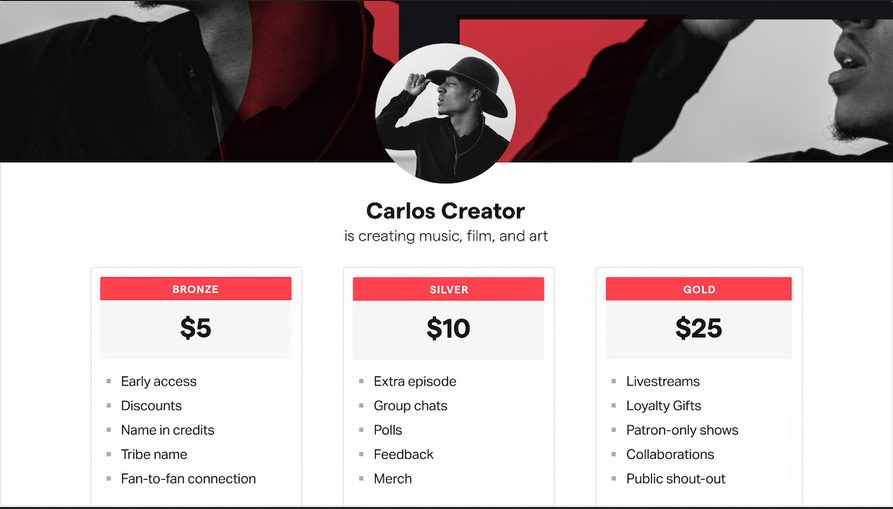
If you’re not ready to charge admission to your online community yet, one option is to pair it with a Patreon account as it gives members the option to become patrons rather than paying members. This option lets members choose to support you, and you can even mix in a community as a Patreon bonus.
17. Udemy
Udemy is another course platform, and while it has some downsides, it offers a totally different approach to community building. Udemy is a course marketplace, meaning that customers must choose your course from thousands of others.
For those who want to start on a course platform instead of with their own course, Udemy is a good option. They’ll take some of your revenue, paying you only 37% of your fees for those who find your course through their website, but some creators choose it for creating their first course and starting to build their brand.
18. Google Analytics
While we think of Google Analytics (GA for the cool kids) as something that measures website traffic, it can also be used to measure community traffic. With a Mighty Network, you can integrate your site with Google Analytics to find out exactly where your potential community members are coming from and how they’re finding you, not to mention their behavior once they get to your community landing page (do they click, or bounce away?).
It’s really good data to have, and can give you insights about how your landing pages are converting or which traffic sources to work harder on. You can read more about Mighty Networks and Google Analytics integration here.
Conclusion
If you’re new to online community building, hopefully this article has given you a sense of what tools you should be looking for and how you can use them. There are so many great options out there. But remember, don’t get carried away. It’s easy to get caught up in tools and forget that building a community looks different to different creators–it’s important to find what works for you and your audience and learn to do it well.
And if you’d like to try Mighty Networks, you can check it out absolutely free for 14 days!
Ready to start building your community?
Start a free 14-day trial to explore Mighty—no credit card required.
More like this


Join Mighty Community
Learn the principles of Community Design™ (and see them in action) alongside thousands of creators and entrepreneurs. It's free to join!


Online Courses
Creating a Course
Teaching a Course
Course Platforms
Selling a Course
Communities & Memberships
Community Platforms
Managing a Community
Building a Community
Growing a Community
Monetizing a Community
Creators & Entrepreneurs
Monetization
Content Creation
Starting a Business
Website Builders
Creating & Managing a Website
Events
Event Platforms
Hosting & Marketing Events
Branded Apps
Creating a Mobile App
Coaching Apps
Community Apps
Coaching
Mastermind Groups
Starting a Coaching Business
Coaching Platforms
Filter by Category
Online Courses
Communities & Memberships
Creators & Entrepreneurs
Events
Branded Apps
Coaching
Start your free trial
14 Days. No Credit Card Required.