


Communities & Memberships
Mighty Networks vs. Circle: Which Community Platform Fits Your Needs?
If you’ve been looking for a place to host your online community, we’re diving deep into two options.
Author
Mighty Team
Last Updated
July 20, 2026


Mighty Networks and Circle are two of the most popular platforms for building an online community. In this article, we're comparing both.
Here's how we handled this:
Community features: What each gives you for member engagement, Space-building and content delivery, and options for courses and events.
Marketing & business tools: What each gives you for business and brand building, getting your offers seen, retaining members, and integrations.
Apps and access: What each gives for native mobile apps, branded apps, and access.
Monetization and pricing: What each includes for the price.
Mighty Networks vs. Circle: Who are they?
Mighty Networks
At a glance
Community platform and course builder ranked a top community management platform by G2.
Bring your community, courses, livestreaming, and events together in the same Spaces under your brand.
Has built communities and branded apps for the world's top creators and brands: Tony Robbins, TED, Mel Robbins, Marie Forleo, Jim Kwik, and Matthew Hussey.
Founded by Gina Bianchini, who also co-founded Ning (the OG community platform) with Marc Andreessen.
Software boosted by AI & designed to connect members to each other and create a network effect.
Circle
Community platform with Spaces for discussions, courses, events, or content consistently ranked with a Leader badge by G2.
Launched by a team of former Teachable employees in 2021.
Early emphasis on community software (and Teachable integration), but added courses (2022) and events and became a standalone community platform.
Used by creators like Pat Flynn, Jay Shetty, Ali Abdaal, and Brendan Burchard.
Offers a clean platform with some integrated marketing tools like email and websites.
Mighty Networks vs. Circle: Comparison chart
Mighty Networks | Circle | |
|---|---|---|
Multi-Feature Spaces | - | |
AI Member Engagement (profile matching, similarities, conversation starters) | - | |
AI Agent (member support & Q&A) | - | |
Course & Community in the Same Space | - | |
Courses | ||
Livestreaming | ||
Gamification & Leaderboards | ||
Website Builder | Landing pages only | Full website builder |
Currencies Supported | Up to 10 currencies from among the 129+ that Stripe supports | One currency per paywall from among 25+ that Stripe supports |
Email Marketing | Kit Integration | Native (paid add-on) |
Branded Mobile Apps | Mighty Pro | Circle Plus |
Mighty Networks vs. Circle: How to compare
What they have in common
Both platforms share a lot of core features as leading community platforms. Here's what's genuinely comparable between the two:
Both platforms offer brandable community, course, and event experiences across web and mobile, with premium branded app options available on higher-tier/custom plans. The member-facing app experience is comparable between the two.
Chat & community activity feeds with posts, comments, replies, video, photos, articles, files, polls, questions, and surveys.
Livestreaming w/ live chat, multiple guests, and automatic replays.
Async or live courses, with structured content and course quizzes.
Landing pages, sales pages, and marketing administration to support sales conversion.
Your own logo, visual imagery, single sign-on (SSO), and integration with outside tech stacks.
Member profiles, search, directories, badges, tags, and administrative features.
The option to have your own branded iOS and Android apps in addition to your own white-label website.
Points of comparison
If you're deciding between Circle and Mighty Networks, these are the main points of difference. We'll break down these differences below.
Comparing customization and features. Things like online course creation, paid memberships, discussion boards, polls, Q&As, member profiles, livestreaming, video uploads, and more. Plus, we'll look at how both are integrating AI tools.
Marketing, branding, & APIs. How can you get your courses and community in front of people? Email? Notifications? Landing pages? We'll compare.
Mobile app options. Accessibility is vital. Online community platforms that can be built for and across the web, iOS, and Android are a must. We'll also compare branded apps, and admin tools, where there's genuine difference.
Comparing monetization & pricing. Community is more than just engagement features. Many Hosts are looking to build businesses with a community, either by adding it to courses or by monetizing the community itself. We'll compare what these platforms give you for running your business and the pricing of each.
Mighty Networks vs. Circle
Comparing customization and features
Mighty Networks
Mighty Networks blends an all-in-one, easy-to-use interface with a powerful content engine that lets you create and customize short posts, video, long-form blogs, questions and polls, livestreaming, courses, and events.
AI-Boosted Member Engagement
Mighty is designed to introduce members to each other, with AI engagement features to help members build profiles, find interesting people, see similarities, and start a conversation.
AI-boosted member profile creator and People Explorer
An AI assistant (Mighty CoHost) that coaches Hosts on how to build their community.
Members organized by location or interests. It can automatically surface interesting members you should know, "Show Similarities", and start a conversation with one-click.
Customizable welcome checklist and personal welcome
Auto-generate and schedule discussion questions to keep engagement going even when you're not online.
Hosts can see lapsed members and send an auto-re-engagement message with 1-click.
Gamification with streaks, milestones, automated trigger unlocks (e.g. challenges, courses, 1:1 calls, etc)
A recognition system so members can recognize others for embodying community values
Easy 1:1 or group chats & messaging


Flexible Spaces
One of the biggest differences between Mighty and Circle is how each handles Spaces. A Space works like a container where you can custom-build experiences using any of the features above.
In a Mighty Network, a Space can have multiple features within it, including:
Chat
Discussion Feed
People Explorer (Members)
Courses
Discovery
Events w/ RSVP
Content Page
Highlighted Hashtag
Any of these can be toggled on or off, depending on what you need. Basically, you can customize the features you want to include for each space.


But you can also build from one of 10 Space templates. For example,
For a course space, you can start with a pre-recorded course and build around it or teach a live course.
For a discussion space, you can lead with conversation tools.
For an event space, you can build with a landing page, RSVP tools, and reminders built in.
Courses & Events
Mighty offers an AI-boosted course creator with two ways to deliver courses: live and asynchronous.
Live: Use the native livestreaming function (or the Zoom integration if you prefer) to host a live course, with running chat, downloads, comments, and recording.
Async (pre-recorded): Use the Table of Contents feature to build out a content course with text, video, downloads, quizzes, comments, and/or integrate a recording of a live course!
Events come with landing pages, RSVPs, invite links, email reminders, and integrated joining. Mighty works great for virtual events, but can also be used to run a live event or conference.
Mighty's Best Features
Live, robust, and branded mobile app and web access (iOS & Android)
Livestreaming for up to 50k, + backstage and high-velocity chat. Go live directly across web and mobile apps & download the recording after.
AI-boosted community tools for connecting members and creating content: polls, quizzes, surveys, challenges, gamification, and more.
Spaces that let you sell content, courses, and/or events separately or bundled with membership.
Upload directly and post pre-recorded videos, images, and audio clips within your Mighty Network.
Chat & messaging 1:1 or in groups.
Intuitive online course creation for engaging teaching that includes video lessons, student engagement tools, Q&A forum functionality, and more!
An "activity feed" feature makes it easy for members to keep track of all the awesome content you're providing.
Add paywalls and different membership tiers that are either community-wide or dedicated to a specific group or course.
Circle
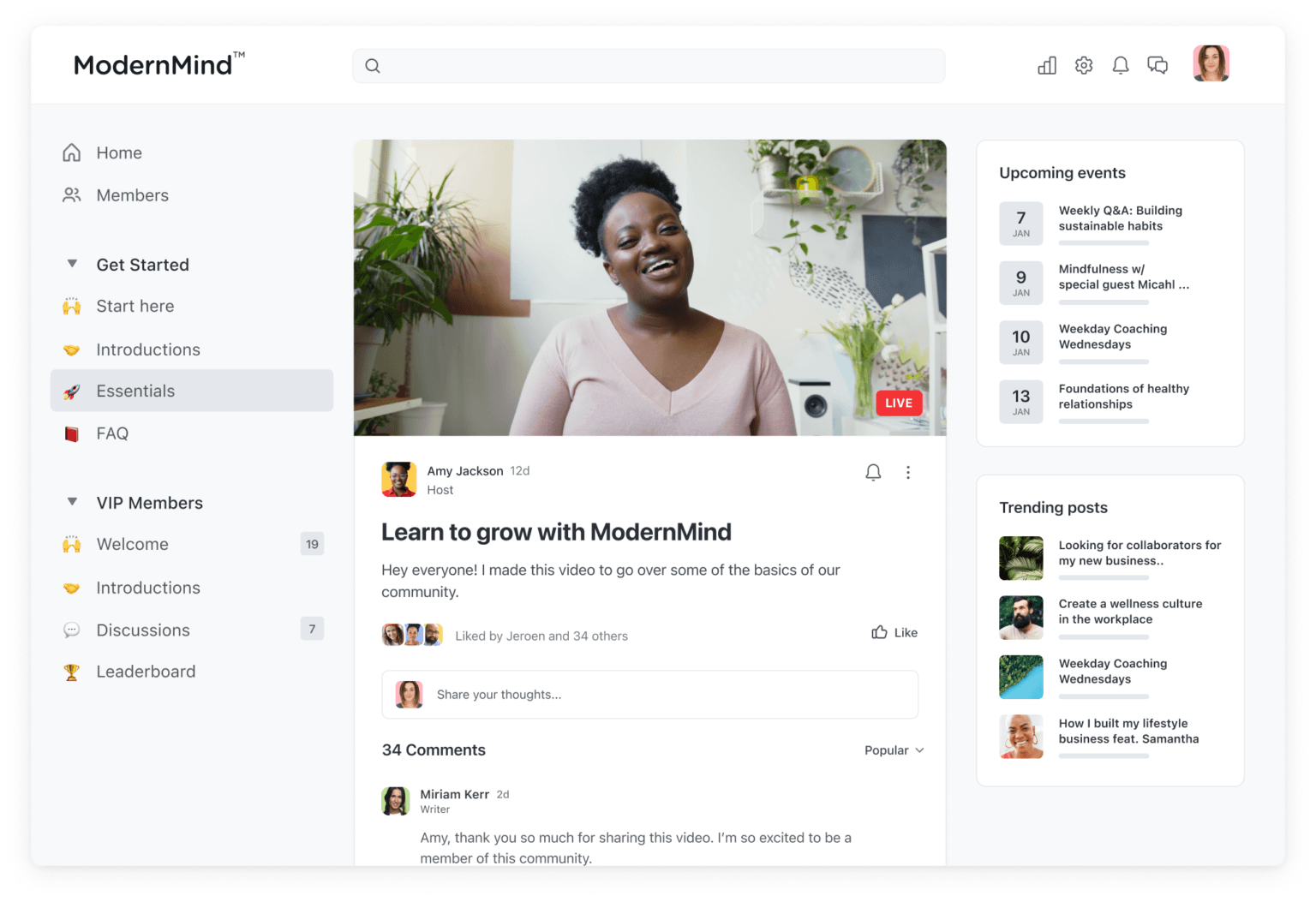
Circle has a clean homepage with spaces on the left, an activity feed in the middle, a welcome article for new members, as well as upcoming events and trending posts on the right. Here's how Circle handles member management.
Directory-Based Member Management
Circle's member directory has a clean design with big photos, names, and a simple blurb that describes a person. It's off by default, but can be easily turned on to get to the filters. Members can also decide when they join if they want to be listed in the directory.
Here are some of Circle's member sorting tools:
Grid/list toggle profile index
Sort members by location, tags, or activity score.
Flyout member profiles with comments & activity summary
Pre-set welcome article
An activity score to show how engaged a member is
Gamification with points, badges, leaderboards, unlocks, workflows, and custom rewards (unlike Mighty, Circle doesn't have streaks or recognitions)
Circle's AI is quite different from Mighty's, and it's worth understanding the difference.
AI Copilot is an in-platform assistant for admin tasks and community insights, available on all plans.
AI Agents trained on your content, available via DMs and community search to support and coach members. These are only on higher-cost plans.
AI Workflows include automation for onboarding, tagging, and moderation tasks
AI auto-transcription and content generation turns livestreams or discussions into written content
Spaces by Type
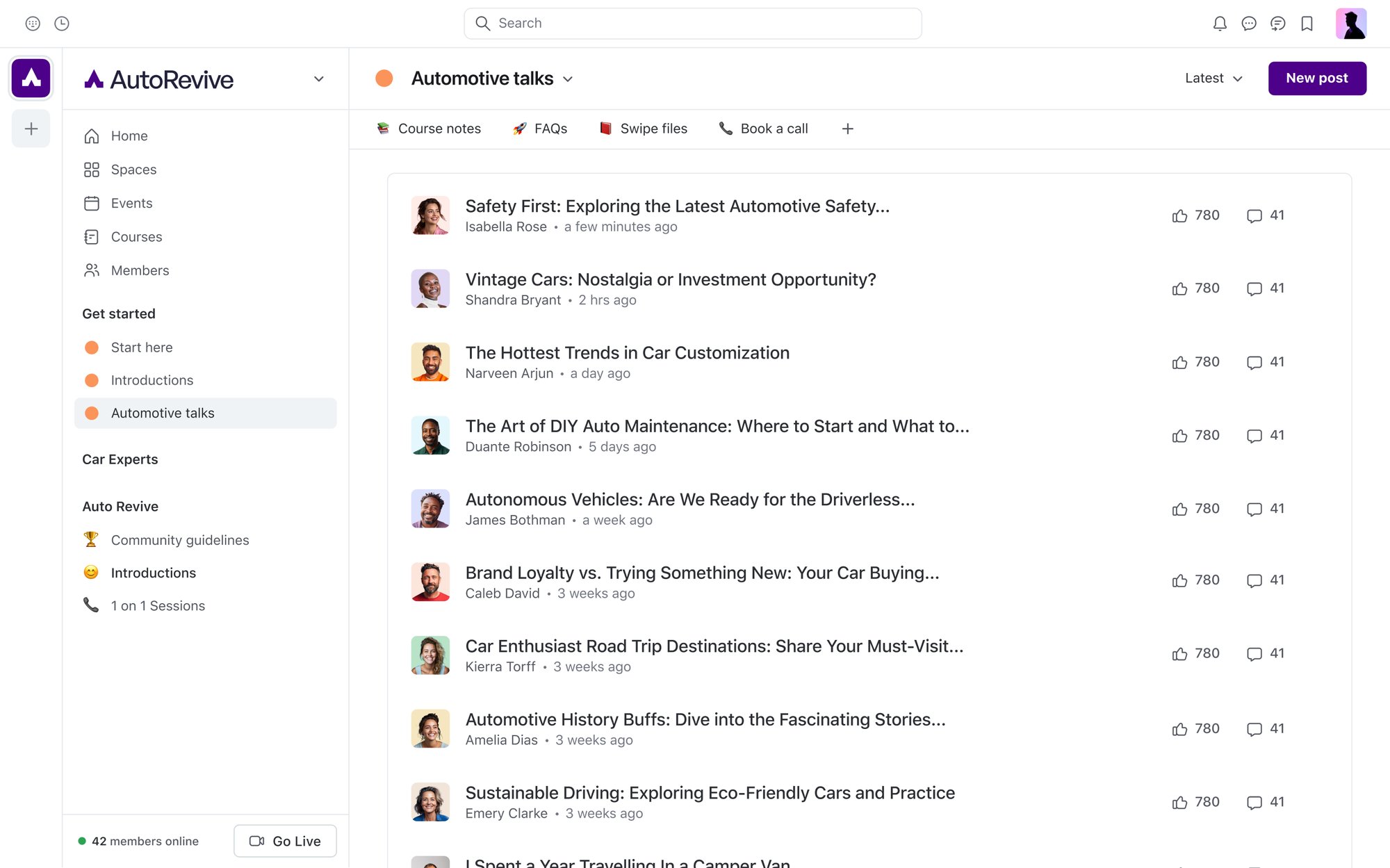
Circle's Spaces are divided into content types; the first step with Circle is usually to choose what kind of space you want to build.
Circle organizes content into different Space types, such as posts, events, chat, courses, and members. Related spaces can be grouped and bundled, but each Space is still built around a primary content type. To manage access across multiple Spaces at once, Circle uses Access Groups: you bundle several Spaces together and connect the bundle to a single paywall or offer, rather than gating each Space individually.
Spaces can be customized with icons (emoji or custom uploads) and assigned their own moderators.
This can be used to manage large communities, but smaller communities may find a single-feed approach easier to keep active.
Events & Courses
Circle has very similar features to Mighty when it comes to events and courses. A course can be run on a Table of Contents as a pre-recorded course. It can be built with different types of content: video, text, images, quizzes, etc. Or, you could use the livestream function to teach a cohort course.
Like Mighty, Circle can also host events. This means creating an event space, which gives you an event landing page with an RSVP function.
Here are some of Circle's best features
You can create private spaces within the community made for either a post, an event, a chat, or a course & sell or bundle access to these.
Native livestreaming, AI auto-transcription, & content generation.
AI Agent tool can be trained to answer members' questions.
Members can create their own profiles & browse a directory of other members.
You can integrate existing content easily into your community space.
Members can access the community through an app.
Integrates with other online course platforms like Teachable
What's the difference?
Both Mighty and Circle have good community-building features. Here are some of the main differences:
Mighty's built-in AI is designed to connect members together: auto-profiles, matching, instant convo starters, question generators, and re-engagement.
Circle's built-in AI is a useful AI Agent tool that can be trained to answer members' questions (only available on higher tiers). Mighty's Cohost AI feature is more directed toward coaching the Host.
Circle's AI tools are strongest for support, onboarding, coaching, content, and workflows, less so for proactively connecting members to each other based on shared interests or sparking conversations.
Mighty's Spaces can hold multiple features and there are 10 different templates to choose from. On Circle, a Space holds one type of content (e.g. you can't connect a course and event in the same Space).
Marketing, branding, & APIs
Mighty
Marketing
Here are some of Mighty's marketing features:
Landing page builder & editor for network & Space marketing pages.
Optimize your network for SEO to attract search traffic (toggle on or off)
Add emails (w/ customization), newsletters, announcements, and weekly digests with Mighty's built-in email tool. Or connect to Kit (formerly ConvertKit) for even more functionality (more below)
In-network custom navigation links (e.g. to an online store, calendar, podcast, YouTube Channel, etc.)
Branding
As far as branding your community, Mighty comes with a lot of control over the look and feel of your community at every level.
Tags, badges, and custom fields
Custom Email domain and SSO
Brand colors, logos, icons, and custom navigation
Email & landing page customization
Custom Spaces
Premium branded apps
And, for established brands and companies, Mighty Pro will build you a branded app completely under your brand. We'll talk more about this below.
Integrations & APIs
Mighty offers Zapier, embeds, Kit, pixels, SSO on higher plans, and API/MCP access on Scale. It also has affiliate tracking.
Mighty's Kit integration means you can seamlessly connect email and community (No Zapier needed). Set up your branding and visuals once, then use your Kit editor to pull in content from your Mighty Network to your emails. And build community automations and sequences in a best-in-class email software.
Mighty Networks also offers support for iFramely, which means ~2,000 services you can embed natively and look great on the web, iOS, and Android. This gives you support to integrate tools like Calendly, Dropbox, Figma, Loom, Notion, and Google Calendar.
Circle
Marketing
Circle has many similar marketing features to Mighty to help you market a community:
Member referrals and welcome links
Announcements and digests
WordPress plugin
However, one difference is that Circle has a native email tool as well, for an additional cost. It comes with features like audience segmentation, links to community events, and email analytics. And you can connect emails to tags, triggers, and other community automations.
Circle now has a native, drag-and-drop website builder for homepages, landing pages, sales pages, and even booking pages without third-party tools; these are available on every Circle plan. Pages support dynamic access control, so you can restrict content to the public, logged-in members, or specific groups.
Branding
Circle has some of the same branding and customization functionality Mighty does:
Custom domains, email, and SEO
Logos, branding, colors, fonts
CSS on the higher-tier plans
Customize navigation and space cards
Add custom fields
Brand email templates and addresses
And like Mighty, Circle offers a branded app, which we'll talk about below.
APIs & Integrations
Circle offers Zapier, snippets, native integrations, Admin API, and Headless Member API on higher plans.
Here are a few important details:
Circle's Embeds are similar to Mighty's and include Facebook, Instagram, and X.
Native Integrations focus on video and audio player embeds, along with Single Sign-On (SSO), also offered by Mighty.
Snippets include Google Analytics, Google Tag Manager, Meta Pixel, and Rewardful for affiliates.
Support for Rewardful and "headless community APIs."
Finally, Circle has a subset of Zapier integrations similar to those on Mighty Networks.
What's the difference?
As far as branding goes, Circle and Mighty both let you customize your theme with light and dark mode, adding brand assets (e.g. logos) or your own color scheme. Also, Circle and Mighty both give you onboarding customization, let you connect to your own domain name, and more.
Circle has an email marketing software built-in with automations and segmentation. Mighty has a built-in Kit integration to take advantage of the third-party email software. In both cases there is an extra cost associated, Circle's native email is an additional cost which increases as your list grows.
Circle has a website tool that can build public-facing websites. Mighty includes landing pages, but not full websites.
Circle has headless community APIs.
Monetization & pricing
Choosing a community platform isn't just about the community features. It's also about finding the place to launch and scale your business effectively.
Mighty
Monetization
Here are some of the ways you can monetize and grow a digital business in a Mighty Network:
Choose from free or paid Spaces or community memberships (either monthly, yearly, or one-time).
Add upsells within a network: e.g. sell online courses, events, masterminds, coaching, etc.
Manage plan access and build bundles
Support up to 10 currencies from among the 129+ that Stripe supports
Learn from detailed community analytics that break down both revenue and member engagement by network or Space.
Pricing
Mighty Networks offers 3 different plans (see annual pricing):
Launch Plan at $79/month and a 2% transaction fee
Scale Plan at $179/month and a 1% transaction fee
Mighty Pro Plan where you get your own branded mobile apps. (See Mighty Pro features.)
And the 'people explorer', AI options, livestreaming, and multiple features per space are available on every plan.


Circle
Monetization
Here are some of the features Circle gives you for running a community business.
Sell access by network or by Space & build bundles and plans
Sell courses and/or events in separate Spaces
Supports 25+ local currencies through Stripe; though each paywall is set to one currency.
Detailed activity and revenue analytics for understanding your business.
Pricing
Circle has similar plans and price points to Mighty Networks:
Professional at $89/month and a 2% transaction fee
Business at $199/month and a 1% transaction fee
Circle Plus with custom pricing
What's the difference?
Both Mighty and Circle give you ways to monetize communities, courses, and events.
Mighty lets you support up to 10 currencies from among the 129+ presentment currencies that Stripe supports (Circle only has 25). Mighty also has token-gating options.
For email, you can use Mighty's Kit integration. Circle's Email Hub is a paid add-on on Professional and Business, with 10k contacts included on Circle Plus.
Mobile app options
The best online community platforms allow you to build a space that is available where your members are: apps.
Mighty
Mighty Networks has developed full, responsive apps to make your online community available whenever, wherever.
When you use a Mighty Network, your users will be able to access your branded community wherever they are across the web and via the Mighty Network app available on Android and iOS.
Notably, Mighty's app has a nearly identical feature set to the web platform, even at the admin level. This includes comprehensive in-app admin features for completely managing your community, plans, access, and content on mobile.
Branded Apps
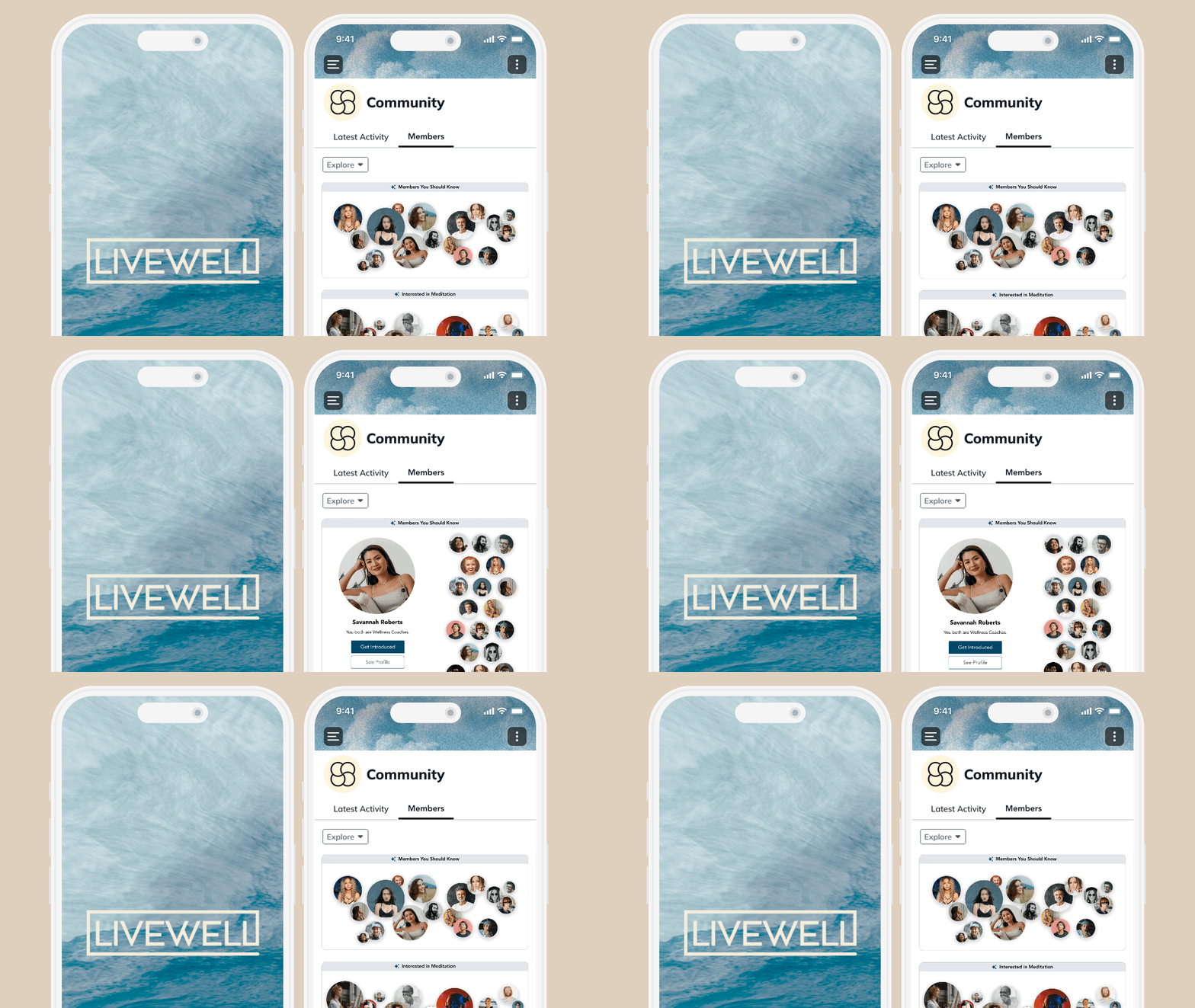
When you upgrade to Mighty Pro, you can even have your own branded app in the Apple app store and Google Play store.
This includes:
Top-rated community platform on your own apps.
Branded apps, splash screens, and push notifications.
Proactive updates and App Store & Google Play Store submissions.
VIP support from the Mighty Pro Team.
Access to the Mighty Pro community.
Circle
Circle offers a clean and easy-to-navigate design for your online community website, and the web app works well. However, Circle does not have the level of admin control at the app level. There are still admin functions that need to be done from the web app.
Circle also has a branded app option with Circle Plus. Circle Plus puts your community on a branded app in the App Store and Google Play Store. Their team works to build and submit the app, similar to Mighty Pro.
What's the difference?
Mighty has more experience building branded apps, with 600+ builds. But the two platforms both offer this feature.
Circle has limited admin on its app, while Mighty offers admin parity between its mobile and web apps.
Migrating from Circle to Mighty
Want to try Mighty Networks... Free?
Circle and Mighty Networks are both strong, well-built community platforms. The right one depends on what you're optimizing for.
Circle is a clean, focused platform that consistently scores well in G2 rankings. Its Spaces keep content organized by type, its new website builder is available on every plan, and it's a strong fit if you want a simple, polished community without a lot of feature sprawl.
Mighty Networks is built with more for community engagement, including AI-boosting member connections and an excellent suite of gamification features. And with its multi-feature Spaces, it gives you flexibility in building content that Circle can’t match.
And you can try it free for 14 days, no credit card required.
Ready to start building your community?
Start a free 14-day trial to explore Mighty—no credit card required.
More like this


Join Mighty Community
Learn the principles of Community Design™ (and see them in action) alongside thousands of creators and entrepreneurs. It's free to join!


Online Courses
Creating a Course
Teaching a Course
Course Platforms
Selling a Course
Communities & Memberships
Community Platforms
Managing a Community
Building a Community
Growing a Community
Monetizing a Community
Creators & Entrepreneurs
Monetization
Content Creation
Starting a Business
Website Builders
Creating & Managing a Website
Events
Event Platforms
Hosting & Marketing Events
Branded Apps
Creating a Mobile App
Coaching Apps
Community Apps
Coaching
Mastermind Groups
Starting a Coaching Business
Coaching Platforms
Filter by Category
Online Courses
Communities & Memberships
Creators & Entrepreneurs
Events
Branded Apps
Coaching
Start your free trial
14 Days. No Credit Card Required.